
Human-focused skin
Layered subsurface response, transmission, dual-lobe specular, makeup, detail normals, packed maps, and stabilized shadows.
Skin, hair, eyes, teeth, tongue, clothing, and visibility—together.
A complete URP character material toolkit with specialized human shaders, one editor workspace, texture packing, reusable profiles, diagnostics, runtime controls, and painted or geometric skin visibility workflows.
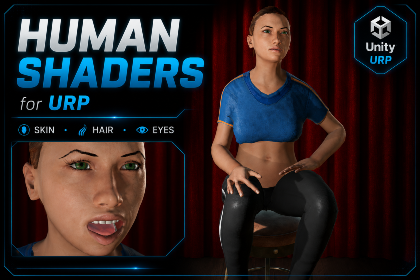
Human characters are not one generic PBR surface. Human Shaders gives skin, hair, eyes, teeth, tongue, and clothing the separate optical treatment each surface needs while keeping authoring inside one connected Unity workflow.
Human Shaders Studio converts character materials non-destructively, packs shader-ready maps, creates reusable profiles, authors clothing visibility regions, and validates the finished character from one focused editor.
The package connects authoring, runtime behavior, and the controls needed to integrate it into a real game.
Layered subsurface response, transmission, dual-lobe specular, makeup, detail normals, packed maps, and stabilized shadows.
Multiple coverage modes, strand opacity, flow mapping, shifted highlights, fiber transmission, pigment controls, and dedicated passes.
Separate sclera and iris response, redness masks, pupil dilation, limbal controls, virtual iris depth, cornea, wetness, and reflections.
Specialized tongue and teeth shaders cover soft tissue, saliva, enamel, dentin, moisture, transmission, detail, and staining.
Woven, knit, denim, silk, velvet, leather, and synthetic workflows with fibers, sheen, transmission, coating, and wetness.
Hide covered skin through geometry-aware painted regions or exact sphere, box, capsule, and convex mesh zones at runtime.
The exact controls differ, but each STL Dynamics system is structured to get a first result quickly and leave enough depth for serious tuning.
Open Human Shaders docsSelect a character hierarchy and let Human Shaders Studio identify and non-destructively convert its materials.
Pack optimized maps, tune each surface, and save reusable optical profiles without coupling character textures.
Author hide regions, create visibility sets, expose runtime controls, and validate the complete character setup.
Real editor workflows, runtime demos, feature breakdowns, and package presentation from the included media.
Open the official STL Dynamics videos on YouTube for the complete walkthrough and focused tutorials.
8 focused documents are available in the STL Dynamics documentation hub for Human Shaders for URP.


Define reusable SoundEvents, route playback through one managed pool, and keep large scenes under control with distance behavior, voice limits, loop virtualization, mixer routing, and runtime diagnostics.
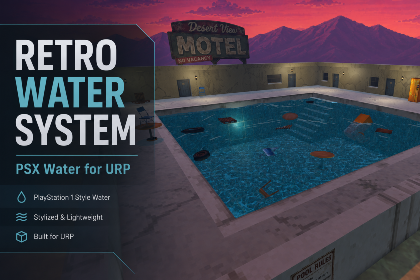
Build lakes, rivers, pools, swamps, and bounded oceans with profile-driven retro rendering, CPU surface sampling, Rigidbody buoyancy, projected caustics, underwater effects, and tiled-ocean LOD.

A complete bone-based secondary motion toolkit for hair, tails, ears, straps, cables, soft-body motion, plants, and accessories—with setup wizards, rig painting, smart collision, wind, runtime forces, optimization, and debugging.